Secured Access
Phone Verification
Secured Access
Phone Verification
Method Description
The Phone Verification system, manual or automated system, would verbally give MSL Code, which includes unique number assigned to each Merchanr and a unique number assigned to each call, to the Consumer
Example:
  • Our MSL Code is 25-4771177-872939
Consumers calling Merchant's verificaion system would use the MSL Code to complete the verification.
Following are the steps in executing the transaction:
Wallet Based:
Step 1 of 3

MSL Wallet:
Step 1 of 3
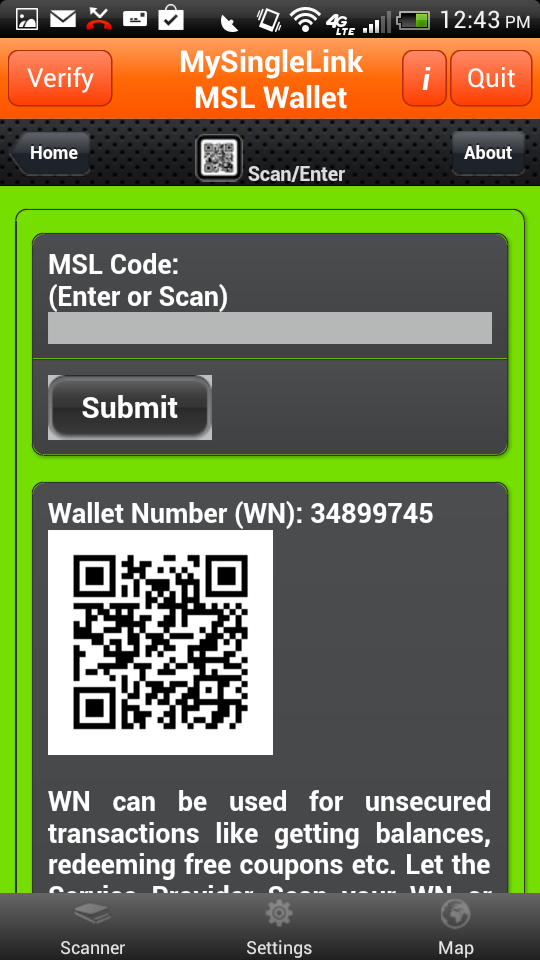
  • Consumer would receive the MSL Code veribally from Live Operator or from and Interacitve Voice Response system.
    Consumer would enter the MSL Code in 'MSL Wallet'
Step 2 of 3
Step 2 of 3:
Mobile Device with a Finger Print Reader:
  • Consumer places finger on the finger print reader.
    Upon finger print verification, Consumer would receive a random number.
Mobile Device without a Finger Print Reader:
  • Consumer would receive a random number with * from 'MSL Wallet' and convert it into SUDS by replacing '*' with their own PIN
    Example:
          Random Number: 2*69*9
          PIN: 19
          SUDS: 216999
Step 3 of 3:


Step 3 of 3:
Mobile Device with a Finger Print Reader:

  • Consumer would verbally give the random number to a Manual Phone Verification System or enter the random number on the Phone's keypad in case of Automated Phone Verification System.
    Phone Verification System would grant/deny the access based on the SUDS.

Mobile Device without a Finger Print Reader:

  • Consumer would verbally give the SUDS to a Manual Phone Verification System or enter the SUDS on the Phone's keypad in case of Automated Phone Verification System.
    Phone Verification System would grant/deny the access based on the SUDS.
 
Secured Access
General Description

Secured Access Transaction is one that involves accessing a Secured Resource like Web Site, Financial Information, Medical Records, Office, Home, Lockers, Airports, Personal Verification etc.

MySingLink, based on their propreitory technology, has developed 2 broadly categorized Paperless Transaction Processing methods namely Wallet based and Card based. Wallet based method uses 'MSL Wallet' which is a free App available for iPhone, iPad, iPod, Anroid Phones and Tablets. Wallet based method is card less and uses SUDS (Single use Digital Signature) for Secured Transacntions whereas Card based method uses a card with a magnetic stripe (MySingleLink Card or Consumer Custom Card or Merchant Custom Card). To know more about these methods, please click on How It Works from the Main Page.

Since Wallet Method provides highest security and Secured Access Transactions require higest security, only Wallet Method can be used for Secured Access Transactions. Also Wallet Method does not require a physical card. Wallet Method consists of the following 2 steps and usually takes less than a couple of seconds to complete the processing:

  • Access Requestor (Example: Consumer calling Merchant's Customer Support) verbally receives Access Provider's (Example: Merchant) number.
  • Access Provider (Example: Merchant) receives SUDS from Access Requestor (Example: Consumer calling Merchant's Customer Support center) and grants the access based on SUDS
Wallet Method can also be used for Applications that require Secured ($) Payment and following are some examples:
  • Payment Processing at the Counter
  • Payment Processing at the Table
  • Payment Processing at the Pump
  • Payment Processing at Mobile Location
  • Payment Processing Online
  • Payment Processing at ATM
  • Payment Processing on Display
  • Payment Processing on Advertisement